If you've been following this blog for long (or had your Kindle more than a few days), you are probably starting to discover a couple of flaws in how Amazon handles your library both on the Kindle and in the archives. This post is intended to help you with a few of those and includes observations I've made from having a rather huge library (I've been told by Kindle support people that they considered 100 books to be "quite large", despite early press conferences where Bezos bragged of someone that was hitting 1,000, and mine was the largest they had ever seen); with nearly 9,000 titles at this point, my library has become so unwieldy that it is nearly impossible to find anything in it and its size is impacting performance of my Kindle ereaders and the
Manage My Kindle page. OK, sure, my library is huge, by most standards; after all, it includes nearly every non-indie free book that Amazon has had in the last several years (I've had a Kindle since about midway thru the original Kindle's first year, so I did miss some of the good, early titles, and I've actually missed one or two since then, but not many) and an increasing large number of indie & backlist titles. The entire family is on the account, so we have books of all genres and for all age groups. I used to try to manage it with collections, but finally gave up on that, on the Kindles themselves. Your collection may not be as large (but if you add 5-10 of the indie books a day, it might not be long before it gets there), but you may want to read thru the post to see if the method I use might take care of giving you some privacy or parental controls with your Kindle library.
One major issue is that the "3,500" books that Amazon claims you can get onto your Kindle is entirely smoke and mirrors. It might physically hold that many, but like any FAT based directory structure, dealing with that many files slows it way down (a problem compounded by how the Kindle loads its collections, if you choose to use those as your primary display). When Amazon added even more features in recent updates, they more than doubled the number of files for each book (there is the .AZW? (or other) file that contains the book, the .MBP that contains bookmarks and notes, the .EA and .PHL for social media information and .APNX); if you did download 3,500 books onto your Kindle, you would be forcing it to deal with 17,500 files in that directory alone, plus all the indexes (and collections) that go along with them. In practice, even as you approach a few hundred, every Kindle starts to slow down (an issue that could have been addressed by different means of displaying the home page, although perhaps at the cost of using a bit more memory when a book was open; as a long time programmer, I am aware that there are always trade-offs, but this one seems driven by inexperience and short-sightedness on the design side).
Another issue is that when your library gets too large, the Kindle (all but the Fire) starts having problems after it syncs - all of mine reboot if allowed to sync, once they try to refresh the archive list. The only solution is to refuse to allow it to sync (keeping wireless off) or to leave it plugged in if wireless is on (so the endless rebooting doesn't drain the battery). The apps don't have the same issue, but a related one - if you remove them (or clear the archives by deregistering), they only want to load the first 3200-3500 or so books (hmmm... there's that number again; looks like a clear programming bug) and then only add new ones added after that. The Kindle devices do something similar, with most of them displaying only older books in the archive (although a couple of the Kindle 3's are now trying to show the entire list after some of the reboots), with roughly that same 3200-3500 titles. It appears (and I've seen other reports of this) that any library over 3,200 or so books will trigger this behavior. Since I like to leave the Special Offers Kindle's wireless on all the time (so I don't miss any), that can be a bit of a problem (I also now send all freebies to it, which helps in sorting the books later on). Also, my main reading Kindle has to have wireless off, so the battery lasts, so I don't get any blog or news updates right away and I have to wait to get any samples or new books I've sent (usually including waiting for it to reboot after it is done).
So, I've started working on fixing my library to be smaller, without actually deleting the books from my archives (and thus, losing access to them) and getting the library more organized. What you'll see below is that first step, which uses the well-hidden (but ever so useful) Media Library feature at Amazon. I don't know why they didn't simply expand this area to give you the social media functions of
kindle.amazon.com, but they didn't (the two areas don't even connect on ratings you assign, which means I never go to
kindle.amazon.com unless I want to copy down a highlight or some notes I made on a Kindle device). The media library allows tags, but they don't show up at
kindle.amazon.com and don't relate to the collections you can create on your Kindle (again, a huge missed opportunity at Amazon to truly produce a social media center that you would never abandon and that could do everything Calibre does, but better) and notes (again, that you only see there) and ratings. You can also add books you own in paper and manage them there, as well. You used to be able to share out your media library (only items you selected to share), but (although the options appear to be there) that function no longer works. You can, though, print out a listing of your collection; with any PDF print driver, that means you can create a PDF of your library (or any category in the Media library or search results) to use for reference when not at home. But, the most useful feature, both for this purpose and for a very primitive version of Parental Controls, is the ability to move items into the "Trash."
Unlike the trash in most email systems, though, this trash area never gets cleaned out. It just accumulates anything you want to add and holds it until you want it back. It also has one big side effect: moving a Kindle book to the Trash removes it from your visible archives and removes it from the
Manage My Kindle page (which vastly increases its speed, as well). It doesn't remove it from the
kindle.amazon.com page, though, and you can move it from the trash back to your main Kindle collection at any time, at which point you can download it from your library again. As you can imagine, this is a feature that many people will want to take advantage of, whether to hide that racy book you bought, so it isn't visible in the archives when you are showing off your Kindle, or just to hide books in the archives that you don't want your kids to see on their Kindles or Kindle Fires. To get started, first you need to locate the
Media Library and that can be a bit tricky. You could go to the
Your Accounts page, then find the
Your Collection link under
Media Library section, or just click
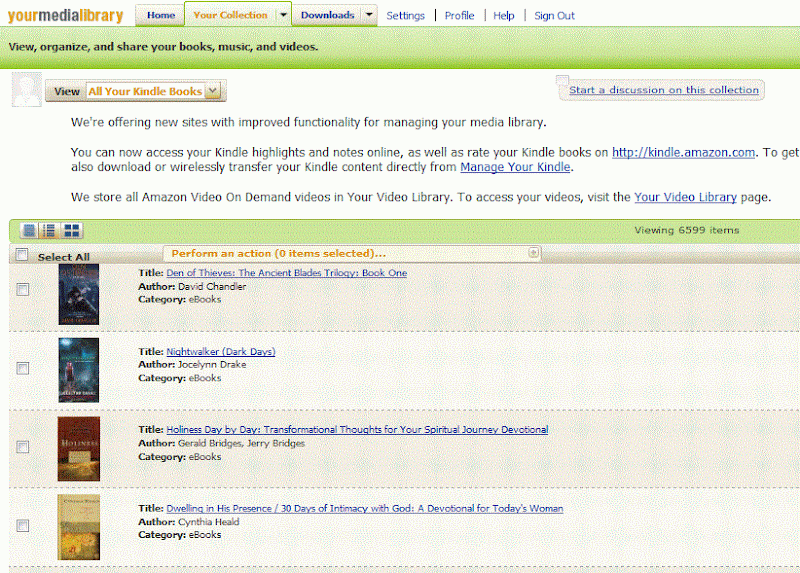
this link to go there directly. After you log in, you should see a screen similar to this one (although hopefully a lot less fuzzy):
You'll want to use the pull-down menu next where it says View and pick
Kindle Items (you can even narrow that down to
Kindle Books on the sub-menu that is displayed if you hover the mouse on
Kindle Items). You'll then see a listing of your books in the lower half of the screen. You can search (upper right corner) or sort (middle right pulldown) or just scroll thru them (the default is by date added, which is generally just what I want).
As you scroll thru and locate books that you want to remove from the "active archives", you may want to look up more info on a book. I've found the best way is to right-click on the cover or title of the book and choose the "open in new tab/window" option from the menu. Go to the new tab and click on the title of the book, which opens (yet another) new window with the Amazon product page. It's a bit round-about, but you don't lose any progress you have made in checking titles, this way.

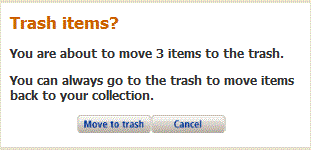
Back in the Media Library, to select a title you'll need to click in the box on the left of the (very tiny) cover image for the book. When you do, a popup will display similar to the one shown here. While you can leave that displaying on the page and keep working, I find it highly annoying (and you can only see about one title at a time below it, on my computer). So, click the little "minus sign" in the upper right corner of the box and it will minimize and get out of the way. You can keep scrolling down and checking off titles, but I've found it's best not to do too many at a time, as there is a time-out set on the page that requires you to log back in and if it elapses, you lose all the work you've done. I have gone over a hundred on checking off books, but now try to limit myself to about 50 at a time, assuming they are all bunched together and I don't do too much researching in between.

Once you have the items you want checked off, we want to get the message box above back, so click on the "plus sign" to the right of where it says "Perform Action" in about the middle of the page. Then, click on the
Move to Trash button in the center of the box that is displayed. After a second or so, most of the page will be "dimmed" and you'll see the confirmation message in the center of the screen. Go ahead and click on
Move to Trash once again. You'll see a progress bar as it works and when it's done, the number of items in Your Collection and in the Trash will have both been updated.
You can use the pull-down next to View to see the totals and to open the Trash itself. To get a book back from the trash, just reverse the process - starting in the Trash, click the box next to the book, and then click
Return to Collection (
DO NOT click on
Delete from Trash or the book will be removed from your account, from what I can tell).
That's it - a quick tutorial on how to move Kindle books out of your "active archives" without losing them (those you truly don't want to keep, at all, can be permanently deleted from the
Manage My Kindle page). Using it regularly should help keep your Kindle running smoothly, save any embarrassment when someone wants to look at your Kindle and let you hide books your 6-10 year old just isn't mature enough to read, just yet, while keeping them on your account for all the benefits of a shared account.
You'll find some other features on the Media Library page that could be useful (such as tags), but most of them have been disabled by Amazon. Tags can be assigned, but the search by tags is broken (you can see them on the book detail page that you access by clicking on the cover or title). The rating feature only seems to work if you tell it a date that you read the book and if you enter comments, be sure to click save before leaving the page. All of which, though, are only useful in the Media Library and none of the sharing features work.

One feature that does work, though, is one that is quite useful: you can open Your Collections, the Trash or do a search, then use Print (near the upper right corner) to create a file that lists all the items. I use a PDF print driver (CutePDF), but you can use the built-in XPS driver (although the output is Windows only, not useful on the Kindle itself). After the PDF file is created, I drop it over into
Dropbox, which automatically syncs it to all of my computers and makes it accessible on my phone, iPad, Kindle Fire and even the Kindle itself (using the web browser, although it's easier to just email yourself a copy to get it onto the Kindle). I keep a listing of what is "in the Trash", along with the active ones in my Collection - either are easier to search than viewing the archives on the Kindle (although hopefully I'll eventually get those trimmed down enough that my Kindles will actually show the entire list and stop rebooting all the time (that makes using the web browser essentially impossible). I did try changing the paper size, so the list would display better on the Kindle, but wasn't very successful (a better PDF print driver might help, though). Instead, I just print to a standard letter size and view it sideways on the Kindle. The print is small, but readable and can be searched.
I do wish there were similarly useful ways to manage your library at B&N (which lacks even a search facility) or Kobo, but there isn't. For those, you'll need to manage everything elsewhere, which is where Calibre comes in handy (and not just for EPUBS, it can manage your Kindle books, as well; no DRM-stripping required).


 Twilight ($2.99), the first of the Twilight Saga books by Stephanie Meyer, is today's Kindle Deal of the Day, a sweet, innocent romance for Valentine's Day (even if it is an underage girl and a century old "teen" vampire). Part 2 of Breaking Dawn doesn't hit the theaters until November, so if you start now, you should have plenty of time to re-read the entire series before it debuts.
 PS, I Love You ($1.59 / £0.99 UK), by Cecelia Ahern, is the Kindle Deal of the day for those in the UK (the US edition is $3.96). If I didn't have a review copy of this one already, I'd be more tempted by it than the first one (although it's obviously going to be a more somber subject).
 The Inn at Eagle Point ($2.14 Kindle, B&N), the first title in the Chesapeake Shores series by Sherryl Woods, is the Nook Daily Find, price matched on Kindle. Fans of the author will find a number of ebooks marked down in either store, but I give the win here to Amazon, who has The Summer Garden for $2.99, at least one title in their Kindle Lending Library and a free Audible edition short story, The Valentine Wedding Dress.