I've moved!

I've moved!

Thanks for stopping by, but it appears you are using a (very) old address for my blog. I've moved to a Wordpress site and you'll need to update your bookmarks for Books on the Knob

I've moved!

Custom Search

Tuesday, November 15, 2011

Kindle Fire and Touch - First Impressions

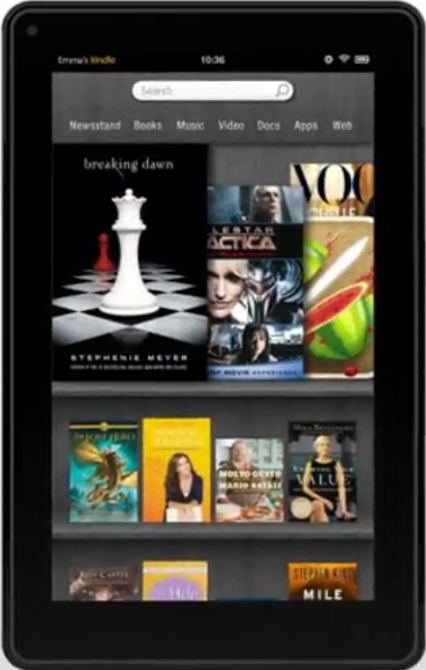
Ok, it's here! I'll leave others to create unbox videos for their Kindle Fire - there will be thousands of those to choose from. Instead, I'm going to use this post (which I may update a few times) to record my first impressions of the Kindle Fire. It's a bit thicker than I thought it would be, with a rubbery black backing (which means it doesn't slip out of your hands as easily), and a bit more square than the nookColor (and heavier, it seems). After turning it on (what, wait to charge? never!), it connects via WiFi (so, be prepared with whatever security info you need at your location). It then registers with Amazon - since this one was ordered on my account and not marked as a gift, it immediately added itself to my account and skipped having to type in my name and password. It then wanted to download an update, but you can skip that if you want (I did, for now). Next, you are run thru a quick tutorial (four pages or so) on how to move using the carousel and how to pin content to the home page so that you can find it quickly.

Once on the home page, the Fire sync'd to my Amazon account (which took a while) and there are two items pinned in the favorites area: Pulse and Amazon. Clicking on Amazon opens up an Amazon shopping app and turns on 1-click ordering for the device. Basically it looks like the same app I have on my Android phone. Pulse is a news app and installs pre-configured with a few sources for news, sports, science, etc. The first thing I had to do after bringing up a page to read was adjust the brightness - I'm in a well lit room, but the default brightness was still much too high (great for outdoors, perhaps) and I could feel it in my eyes (which are probably tired from working on the computer all morning). From within the news item, you can quickly go back home (the carousel) or just bring up a list of other articles from the same news source or all the installed sources (what did I read - an article about trying to get students to use libraries instead of Google when writing research papers and an early review of the Kindle Fire!).

Back to the home page - it's still Syncing. Ok, I'll click on Apps - there's a list of all my Amazon Android Apps; I clicked to install Hulu Plus, then Audible. Netflix is supposed to be coming, but I don't see any sign of it yet in the Appstore (Update: Netflix is now there, but not easy to find). Audible, btw, required a separate login, even though most of use no doubt use our Amazon logins, now. While that was authorizing the new device, I jumped over to the Amazon Prime management page and confirmed - yes, I now had my 30 day trial of paid membership! Which means streaming videos for 30 days and I can rent two books (one this month and one next).

If you grabbed Quickoffice Pro yesterday, the phone version is the one that works with the fire (the HD version is for larger tablets). OfficeSuite Pro 5 is also compatible with the Fire, if you managed to get it when it was free last month. All of the Angry Birds apps seem to be compatible (and I have all but one from the free offerings in the last few months -- if you don't, you can still get them for 99 cents each; grab all three for less than the cost of one in the Nook app store.

One hiccup - I decided to get a game and bought it from the PC. There doesn't seem to be any way to send the app to a particular device and also no way to refresh the list of apps on the Fire itself. So, it thinks I should have to buy the app to get it on the Fire - it's only a dollar, so I thought, why not see what happens if you try to re-purchase an app. Apparently, the answer is that it hangs up and you have to force close the Appstore. There also needs to be a way to remove apps from your library (just as we eventually were able to do with Kindle books), as I need to get rid of some "free" versions of apps that I don't use, as I now have the full version of them, instead.

Back to my library, the two graphic novels I pre-ordered are downloading, as is a cookbook I sent to the fire. No sign of my archives, though (maybe I'll have to wait more than just a bit to see them there; I do hope they show up eventually, though). So, I'll take a break from books and wander over to Videos - looks like there is a Julia Child TV series (The French Chef, Seasons 1-10) included in the free Prime Shipping library. I'm not sure how much I'll absorb in 90 days, but there are definitely worse things I could be using. You watch the video in landscape mode, which puts both speakers on one side (the left) of the screen (so much for stereo). So long as the area isn't too loud, though, there is enough volume (controlled by tapping on the screen) that you can hear it easily (even the intro, which claims S&H Green Stamps is the sponsor!). At least the USB, power and headphones jack are all on the right side when watching (since I may end up having to plug in, eventually). Pressing the screen brings up controls for the video (scroll bar to back up, go forward), audio (slider for volume) and to leave the video. I paused the video, exited, then fired up my Roku - I should be able to start right where I left off, but that presumes I can find the same show again. The Roku controls are much more primitive and I ended up watching Ken Burns Jazz for a bit, instead. I finally found "TV Shows: A-Z" and then located "The French Chef"; and the resume function works just fine. Julia started back on the Beef Stew recipe right where I'd left off on the Fire. What they really need, though is a "last watched" option under the Amazon videos, so that it doesn't take a week to find what you were watching. On the Fire, itself, the show you were watching ends up on your shelf, so it's easy to find it quickly.

Back to books, there are now archives showing. Sadly, they are incomplete, just as with almost all my Kindle devices at this point. Neither of the books I mentioned in an earlier post are missing (in fact, two different books named Abyss are missing). There are a couple of books on Jobs, but not the Steve Jobs biography I bought this morning (the first books shown under "most recent" are some Vook editions from last June). With any luck, the archives will fill in some more, but, sadly, I suspect they will remain permanently broken on this Kindle, as well. Speaking of Vook Books, most of which have enhanced content, you can load some of them up on the Fire (even if the book page says you can't, since I did), but you won't get any of the enhanced content - it is still locked into an Apple device format, apparently. This isn't true of all enhanced editions, as Cornwell's The Fort won't even load up on the Fire in order to read it, even though you can read the text portion on pretty much every other Kindle device and app; I found a number of other enhanced editions that simply refused to load on the Fire (I'll try to see if I can get around that using Read Now, but that isn't looking very promising in the Silk browser, as I keep getting a prompt to allow offline use, but I can't get a click to register on the message box, so that it will continue -- the browser also keeps crashing on the Cloud Reader page and crashed once on the Manage My Kindle page).

So, what about the Kindle Touch 3G? It's here, it looks pretty much like the Kindle, minus the buttons for page turning (instead, you press your finger in the lower 2/3 of the screen, along the left side for back and anywhere from the middle to right side for forward) and any buttons other than "Home", which looks like a menu (it is a bunch of soft stripes). The menu is instead reached by pressing along the top edge of the screen. With any such presses, you have to stay long enough to register a "click", but not so long that you instead start selecting text (which either brings up the dictionary, zooms a picture, follows a hyperlink, etc, depending on where the press occurs). To delete a book or notice - you press and hold on the title on the home page, wait for a menu to appear, pick Delete at the bottom, then click again to confirm.

Rating Kindle Books and Managing Your Library

I suspect I'm not the only person waiting anxiously for their new Kindle Fire today. The one I ordered using the Mastercard promotion is on it's way (but won't be here until at least tomorrow), while the one I ordered immediately is "out for delivery", along with the Kindle Touch 3G I also ordered, so that I could do some comparisons and reviews (at least, that's what I'll tell the IRS at the end of the year! Sshhhhhhh...). My paid Prime membership hasn't kicked in yet (although I now have serial numbers assigned on all the Kindles), so I can't play with renting a book or watching streaming videos, yet. I did poke around in the magazines (more on that later) and found nine that qualify for the 90 day free trial (not Oprah, though, and not Bon Appetit, which is one I was looking for and which isn't even available yet).

So, after I was bored (and I didn't want to start any magazine subscriptions until I had the Fire in hand), I started playing around with the various methods that Amazon gives us to manage our libraries and keep track of which books we've read and what we thought of them. I'll skip the Twitter and Facebook integration -- I don't think anyone that follows me wants to know that I've bought or read a book and I definitely know there are books that I don't want to share the titles on, let alone my reading status or any notes or highlights I've made. What I am interested in, though, is how to keep track of what I'm reading and what I've read, both across several devices and from long ago, and which books I want to try to read next. Amazon gives you four different ways to keep track and, unfortunately, none of the choices talk to each other and there is little to no integration.

The easiest way is to send all books to your Kindle device, then move the books into collections: Read Next, Currently Reading, Read and categories for each genre, perhaps one for freebies, those for your kids (or the collection you show when in church or showing it off), etc. Collections are backed up and you can copy the collections from one device to another. With the newer Kindle for PC versions, you should be able to edit your collections using a decent keyboard, then periodically update the other devices on your account from there. Be aware, though, that if you update collections, it also changes which collection the books on your Kindle belong to - so, if that Kindle for PC app thinks you have just started a book ("reading"), but you've finished it on your Kindle ("read"), then if you update collections, the book will move back to "reading". The big advantage of managing your library on your Kindle is that you don't have to go anywhere else. Your book, notes, it's status and any rating are all in one place (the page after the end of the book can be used to set a rating, which is saved into the notes file of the book). The disadvantages include that your Kindle will get slower and slower, as it fills up, you can't set ratings in the Cloud Reader, the Android App or Kindle for PC (I suspect not in any of the apps) and there are no collections in the apps or older Kindle for PC editions (I don't have a Mac here to check it). You can remove your books from your Kindle after assigning them to a collection or making notes or adding a rating, in order to speed things up and if you re-download the book later on, your notes, collection and ratings will be sent with the book (provided you are allowing Sync on that device). Finding a book, though, can be a bit of a trick if you are managing your library on your Kindle - search can be quite slow (I usually give up and reboot the Kindle after several minutes), although it's much better on the Apps and Cloud Reader.

If you have a large library, though, be prepared for your archives to be incomplete - I have anywhere from a thousand to well over 2,000 books missing from the archives on my various devices and apps. Even Cloud Reader gives different results, depending on whether or not I use Firefox or Chrome to search (Chrome appears to be almost complete, though). Since some pages at Amazon don't show you that you've already purchased a book, either due to an ASIN change or a glitch with Amazon, I have learned to only depend on the Manage My Kindle page if I really want to know if I already have a book in my Kindle library. This problem also means that if I want to read a book from more than one Kindle or app, whether it's me reading in two places or two family members that want to read the book, I have to use the Manage My Kindle to send the book to each device and app, rather than retrieving it from the archives - if you can't see the book in the archive, you can't download it. This can be an issue if you have several people on your account and you don't want all of them to have access to your amazon login - you end up getting phone calls and emails/IM's asking for books to be sent to their Kindles ... assuming they even know that you have added a book to the library.

Another issue with managing your library on the devices is that you can no longer sort the archives by the date added. The original Kindle did this (even sorting by most recent or oldest) and latest Kindle for PC will sort your archives this by Most Recent, but the Android App, iPad app and older Kindle for PC will only sort by most recent when viewing downloaded items, just like the Kindle devices themselves. Again, if you have more than one person on your account, they won't know if you have purchased a new book unless you either send it directly to their Kindle or you send them an email to let them know (unless, that is, they have a photographic memory and browse the entire archive to see which titles are new).

So, that leaves us with online management. The most basic is the Manage My Kindle page that we all know and love. You can sort several different ways, see ALL of your titles (including library loans), can search by title or author and use some basic categories (which are assigned by Amazon, though, based on type of content). No collections, no notes, no ratings. It also requires the login password for the account. From that page, you can also send a book to any device or app (it gets downloaded on the next Sync), although it's much slower since their last "upgrade" of the page, as you now must hover over Actions, pick Send, then pick the device/app, then click Send. The page then is modified to show success and you can start over for the next person on your account ... if you are fast enough to hover and click send before the page notice is also automatically removed, generally causing your mouse to then hover and click on the wrong book. You can also load a book into the Cloud Reader from this page - even on the iPad, which was the only way it worked at all when it was first released, if you had more than a handful of books in your archive.

The next tool Amazon gives us to manage our book is the kindle.amazon.com page. You use your Amazon login, but it is a separate login required page (same password, though, so you can't give it out to all family members). Your notes and highlights made on a Kindle (or app) are saved to the information you'll find on this page, but collections and reading status are not. You can, though, mark books for "Reading", "Read", "Hope to Read" or "gave up", but you must do so on the website and can't see that info anywhere else. Every book you buy, on paper or Kindle, is added to the list automatically (under Hope to Read) and you can sort by title or author... but not by Most Recent. There isn't any search facility, either, only a "search Amazon" box, although you can see on the returned list if you own the book or not (although that may not be helpful if your search brings back hundreds of books). If, though, you are more interested in what other people think is important or funny, this is the place to go, as you can see all highlights that contained the word or words you search for. You can set ratings for your books here, too, but they don't sync with the one you set on the Kindle and you can't see them anywhere else, either. I do find this a useful site to look at only my own highlights, though, as I make a note in the book when I finish reading it, so can sort for that info (on the web page, not an actual search tool) if I can't remember a title I recently finished. This page has taken over the job of managing your Kindle content from the old Media Collections page, which is still there and lets you see all your books, movies, music and more in one place, is a place you can hide books in "the trash" (this leaves them in your collection, but hides them on your Kindle archives) and see the ratings you set at the end of a Kindle book (yes, they linked Ratings to this page, not to the kindle.amazon.com page that has replaced it and that they recommend you use instead). Unfortunately, this page can also be missing titles (I set ratings in four books today - one of them, Abyss (by Hagberg, David) is missing from the Collections page (and from most of my archives on devices); another, How to Flirt with a Naked Werewolf, is missing from the archive of almost all my devices, but does show up in Chrome Cloud reader and on one iPad). I wish they had simply added to this page's functionality, as I like it much better than the kindle.amazon.com page - it grabs up all your content (movies, books, Kindle books, etc), digital or not, and also allows you to add you own items (books you purchased elsewhere, for example). It also lets you print the items being shown (by type or after a search), unlike the other solutions above). You can also mark items as "shared" and set it to share new items automatically - then send a link to the page (use the permalink at the bottom of the page) to other family members, so they can see what books are in the library. You can also use tags for books here, but they don't correspond with collections (yet another stupid decision by Amazon, one that they could correct, but probably won't).

Another place that Amazon encourages you to use to manage your books is Shelfari, which they liked so much they bought it. It can be a bit tricky to find (choose Home, then the dropdown next to "Your Shelf", then Import books), but you can import all the books you've bought from Amazon directly into your shelf, with no typing. Unfortunately, once where, you are back to sorting by author or title, a few basic categories (read, reading, unread, favorites and "own" - which is set automatically if imported from Amazon). No collections and no searching, other than "books" as a whole - and here, I see many, many more titles returned in a search than on the kindle.amazon.com page. You can tell if you own a book in the results - there will be a green Edit button instead of a white Add button under the cover image. You can also share your shelf with others, but you'll have to add new books on your own as you purchase them from Amazon. No collections, no tags (at least, not on your shelves), but you can read reviews (mostly the same as are on Amazon's pages, though) and join discussion groups, if you'd rather do that than read your books. You can also set a rating for each book ... which is, again, completely independent of the other ratings.

So, there you have it, the methods of rating books (three total at Amazon) and managing your library (I think there are five, if you count the old Media Library pages). And, that's just using Amazon alone. The Media Library and Shelfari let you add both paper books and books purchased elsewhere; if you have a large collection, I prefer the Media Library over the others (although it, too, has it's limitations). You can print out a list of your books from the Media Library and (if you've completed enough annoying profile steps) export a list of them from Shelfari. Your notes you create on Kindle devices/apps are on the kindle.amazon.com page, but not in the Media Library (which as it's own notes) or Shelfari; collections are unique to Kindles and some apps (but not all), the Media Library has tags and kindle.amazon.com and Shelfari have no real management other than which ones you've read.

If you are looking for parental controls, by-the-way, you won't find any on any of the sites, from what I can tell. Instead, you'll have to resort to de-registering your kid's devices and apps when you are not buying them a book, then add them back each time you want to add content. You can block their internet access by removing permission in your Wifi router, although this won't work for the 3G Kindles or if they take a WiFi Kindle/Fire to school or McDonald's, etc. The newest nook Tablet promises parental controls, but it seems to be limited to blocking web access, not viewing archives, collections or making purchases.

So, you ask, which of the above do I use to manage my books? I do use the Manage My Kindle page quite a bit, out of necessity. Otherwise, I generally use either LibraryThing or an excel spreadsheet (which Mom maintains - thanks, Mom!) and a search of my hard drive for books I've downloaded elsewhere. If I could ever get LibraryThing caught up, I could use it for most things (but not sending archived books to my Kindle) and it is much better suited to larger libraries. It's another place for ratings and notes, but you can search to find a book in your collection pretty much any way you want. You can import your booklist via Shelfari or the Media Library (which preserves your ratings and seems to actually work better).

Back later ... I hear the UPS truck....

Today's Deals

Additional formats on free books:
Today is the last day to take advantage of these KSO deals:

The Magician's Elephant ($0.99), by Newbery Medalist Kate DiCamillo, is today's Kindle Deal of the Day.
Book Description
In a highly awaited new novel, Kate DiCamillo conjures a haunting fable about trusting the unexpected — and making the extraordinary come true.

What if? Why not? Could it be?

When a fortuneteller's tent appears in the market square of the city of Baltese, orphan Peter Augustus Duchene knows the questions that he needs to ask: Does his sister still live? And if so, how can he find her? The fortuneteller's mysterious answer (an elephant! An elephant will lead him there!) sets off a chain of events so remarkable, so impossible, that you will hardly dare to believe it’s true. With atmospheric illustrations by fine artist Yoko Tanaka, here is a dreamlike and captivating tale that could only be narrated by Newbery Medalist Kate DiCamillo. In this timeless fable, she evokes the largest of themes — hope and belonging, desire and compassion — with the lightness of a magician’s touch.

Age Level: 8 and up | Grade Level: 3 and up

State of Wonder ($2.07 / £1.29 UK), by Ann Patchett, is the Kindle Deal of the day for those in the UK (the US Edition is $12.99).
Book Description
There were people on the banks of the river.

Among the tangled waterways and giant anacondas of the Brazilian Rio Negro, an enigmatic scientist is developing a drug that could alter the lives of women for ever. Dr Annick Swenson's work is shrouded in mystery; she refuses to report on her progress, especially to her investors, whose patience is fast running out. Anders Eckman, a mild-mannered lab researcher, is sent to investigate. A curt letter reporting his untimely death is all that returns.

Now Marina Singh, Anders's colleague and once a student of the mighty Dr Swenson, is their last hope. Compelled by the pleas of Anders's wife, who refuses to accept that her husband is not coming home, Marina leaves the snowy plains of Minnesota and retraces her friend's steps into the heart of the South American darkness, determined to track down Dr. Swenson and uncover the secrets being jealously guarded among the remotest tribes of the rainforest.

What Marina does not yet know is that, in this ancient corner of the jungle, where the muddy waters and susurrating grasses hide countless unknown perils and temptations, she will face challenges beyond her wildest imagination. Marina is no longer the student, but only time will tell if she has learnt enough.

Nemesis ($6.99 Kindle, B&N), by Philip Roth, is the Nook Daily Find, price matched on Kindle.
Book Description
Winner of the Man Booker International Prize 2011

In the "stifling heat of equatorial Newark," a terrifying epidemic is raging, threatening the children of the New Jersey city with maiming, paralysis, lifelong disability, and even death. This is the startling theme of Philip Roth’s wrenching new book: a wartime polio epidemic in the summer of 1944 and the effect it has on a closely knit, family-oriented Newark community and its children.

At the center of Nemesis is a vigorous, dutiful twenty-three-year-old playground director, Bucky Cantor, a javelin thrower and weightlifter, who is devoted to his charges and disappointed with himself because his weak eyes have excluded him from serving in the war alongside his contemporaries. Focusing on Cantor’s dilemmas as polio begins to ravage his playground—and on the everyday realities he faces—Roth leads us through every inch of emotion such a pestilence can breed: the fear, the panic, the anger, the bewilderment, the suffering, and the pain.

Moving between the smoldering, malodorous streets of besieged Newark and Indian Hill, a pristine children’s summer camp high in the Poconos—whose "mountain air was purified of all contaminants"—Roth depicts a decent, energetic man with the best intentions struggling in his own private war against the epidemic. Roth is tenderly exact at every point about Cantor’s passage into personal disaster, and no less exact about the condition of childhood.

Through this story runs the dark questions that haunt all four of Roth’s late short novels, Everyman, Indignation, The Humbling, and now Nemesis: What kind of accidental choices fatally shape a life? How does the individual withstand the onslaught of circumstance?

Monday, November 14, 2011

50+ Free Books from Indie Authors

If you'd like to try out some new authors, all of them independently published, then head over to the Indie Collective's Blog Tour de Troops. Today is the last day, but you should still be able to comment on each author's book promotion post -- every comment gets you a free ebook (the one you comment on, unless otherwise noted in the post; generally a novel, but sometimes a shorter work) and earns you a chance for a free Kindle and gets one more ebook donated to troops overseas. Most of the authors will email you a coupon to pick up their book on Smashwords (a few may email you the book), so be sure to use an email account that you can check. There is often only a short period during which you can redeem your coupon, also, so be sure to pay attention to each author's rules.

Here's the full line-up of all authors and their blogs. You may have to scan down a post or two to find the one that mentions the promotion and has the directions for commenting in order to get your free book, since this has been a 4-day event.
  1. Elena Gray “Full Body Contact” http://elenagray.com
  2. Gracen Miller “Madison’s Life Lessons” http://madisonroadtohell.blogspot.com/
  3. Rachelle Reese & John E. Miller “The Reunion” http://dimestorenovel.blogspot.com
  4. Sherry Ellis “That Mama is a Grouch” http://www.sherryellis.blogspot.com
  5. Valerie Douglas “Heart of the Gods” http://valeriedouglasbooks.blogspot.com/
  6. Zoe Saadia “The Cahokian” http://blog.zoesaadia.com/
  7. Kip Manley “City of Roses” http://thecityofroses.com/
  8. John Zunski “Cemetery Street” http://johnzunski.wordpress.com/
  9. Kelli McCracken “What the Heart Wants” http://kellimccracken.com
  10. Taylor Lee “Struck by Thunder” taylorleebooks.com
  11. George Sirois “Exelsior” www.georgesirois.com
  12. JL Oakley “Tree Soldier” http://historyweaver.wordpress.com
  13. M. Todd Gallowglas “First Chosen”http://mgallowglas.blogspot.com/
  14. Rachel Thompson “My Indie Experience” http://www.rachelintheoc.com/
  15. Belinda Boring “Blood Oath” http://thebookishsnob.blogspot.com/
  16. Stacy Verdick Case “A Grand Murder” http://sostacythought.wordpress.com/
  17. David M Brown “Fezariu’s Epiphany” http://blog.elenchera.com
  18. C.C. Cole “Act of Redemption” http://www.shevata-cccole.blogspot.com
  19. Glenn Skinner “The Keya Quests” http://lostbowyer.wordpress.com/
  20. AK Taylor “Neiko’s Five Land Adventure” http://www.backwoodsauthor.wordpress.com
  21. Ron Vitale “Cinderella’s Secret Diaries” www.ronvitale.com
  22. Leia Shaw “Destiny Divided” http://www.leiashaw.blogspot.com
  23. Ali Cross “Become” http://www.alicross.com
  24. Julia Crane “Coexist: Keegan’s Chronicles” http://juliacraneauthor.com/blog/
  25. Lili Tufel “SAND” http://lilitufel.blogspot.com/
  26. Jackie Chanel “Untitled” http://jackie-chanel.com
  27. Augusto Pinaud “The Writer” http://augustopinaud.com/blog-tour-de-troops-a-simple-way-to-say-thank-you/
  28. Jill Paterson “Murder at the Rocks” http://www.theperfectplot.blogspot.com
  29. Melissa Foster “Chasing Amanda” http://www.melissafoster.com/blog/blog-tour-de-troops
  30. Ann Charles “Dance of the Winnebagos” www.anncharles.com/deadwood
  31. Stephen England “Pandora’s Grave” http://www.stephenwrites.com/
  32. Erin M Klitzke “Epsilon: Broken Stars” www.embklitzke.com
  33. Paul Rice “Getting Well for the First Time” http://gettingwellforthefirsttime.wordpress.com
  34. J Monkeys “The Cordovan Vault” http://secretsof7scribes.wordpress.com/
  35. Sharon Gerlach “Office Politics” http://sharongerlach.wordpress.com
  36. Michael E Mustizer “The Seven Isaacs” www.michaelmustizer.com
  37. Shannon Muir “The Heart’s Duty” http://shannonmuir.wordpress.com/
  38. Jennie Coughlin “Thrown Out: Stories from Exeter” http://jenniecoughlin.wordpress.com
  39. Amber Scott “Soul Search” http://amberscottbooks.com
  40. Terri Giuliano Long “In Leah’s Wake” http://www.tglong.com/blog/2011/11/blog-tour-de-troops/
  41. Anne Tibbets “The Beast Call” http://writeforcoffee.blogspot.com
  42. Tracy Rozzlynn “Verita” http://www.TracyRozzlynn.com
  43. Susan Salluce “Out of Breath” http://sipnsharewithsusan.com/
  44. Alison DeLuca “The Night Watchman Express” http://alisondeluca.blogspot.com/
  45. Delphine Pontvieux “ETA” http://missnyet.wordpress.com/
  46. Brian Jeffreys “Fall of the Terran Empire” http://brianjeffreys.blogspot.com/
  47. Mercy Loomis “Scent and Shadow” http://mercyloomis.blogspot.com/
  48. Dianne Venetta “Lust on the Rocks” http://www.diannevenetta.com
  49. D.M. Kenyon “The Lotus Blossom” www.blog.lotusblossombook.com
  50. Coral Russell “Amador Lockdown” http://alchemyofscrawl.wordpress.com/
  51. Lacey Weatherford “The Dark Rising” http://laceyweatherfordbooks.com

Free Book (Kindle) - The Wounded Heart

The Wounded Heart: Hope for Adult Victims of Childhood Sexual Abuse, by Dan B Allender Ph.D., is free in the Kindle store, courtesy of Christian publisher NavPress.
Book Description
Sexual abuse knows no religious or social boundaries. The Wounded Heart is an intensely personal and specific look at this form of abuse. Dr. Allender explores the secret lament of the soul damaged by sexual abuse and lays hold of the hope buried there by the One whose unstained image we all bear. Includes information about false memory issues.

From the Back Cover
You may think you don't know anyone who has been sexually abused, especially if most of your friends and acquaintances are Christians. But the statistics indicate otherwise. The Wounded Heart is an intensely personal and specific look at this most "soul deadening" form of abuse. Personal because it may be affecting you, your spouse, a close friend or neighbor, or someone you know well at church; and specific because it goes well beyond the general issues and solutions discussed in other books.

Dr. Allender's book reaches deep into the wounded heart of someone you know, exploring the secret lament of the soul damaged by sexual abuse and laying hold of the hope buried there by the One whose unstained image we all bear.